

Manually hunting for Upwork jobs feels productive until you look at what it actually costs you.
You refresh the feed. You open ten listings. You skim vague descriptions. You burn Connects on jobs that were never a strong fit. Then the one perfect opportunity shows up while you are busy doing client work, and by the time you see it, twenty other freelancers have already applied.
That is not just annoying. It is expensive.
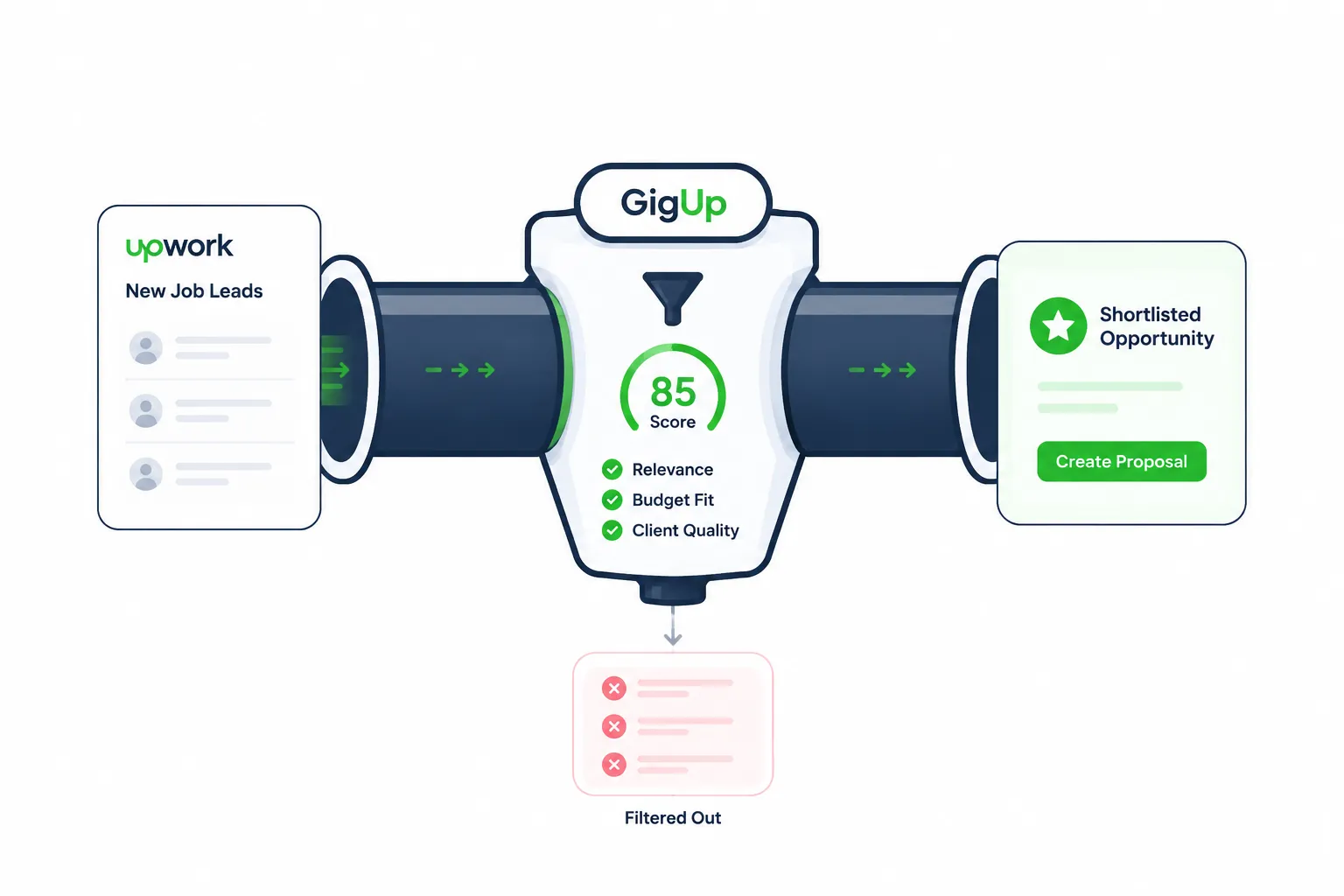
A freelance lead pipeline solves this by turning job discovery into a repeatable system. Instead of reacting to whatever Upwork shows you in the moment, you build a workflow that finds relevant jobs, filters them, alerts you quickly, and helps you draft a proposal while the opportunity is still fresh.
This guide will show you how to build that kind of pipeline with GigUp: one that helps you move faster, waste fewer Connects, and focus your proposal energy on jobs that actually deserve it.
#The Real Problem Is Not “Finding Jobs”
Most freelancers think their problem is not enough jobs.
Usually, that is not true.
The real problem is sorting.
Upwork has plenty of listings. The issue is knowing which ones are worth your attention before your day gets swallowed by low-fit opportunities.
A weak job pipeline looks like this:
- Search Upwork manually
- Open every listing that looks close enough
- Guess whether it is worth applying
- Write or reuse a proposal
- Hope the client replies
That workflow creates three problems.
First, timing is random. You only see good jobs when you happen to check.
Second, quality control is weak. You make decisions based on quick gut feeling, not a clear fit score.
Third, proposal quality drops. When you are tired from searching, you are more likely to send generic proposals just to feel like you did something.
That is how freelancers waste time and Connects.
A better pipeline separates the work.
You should not be discovering jobs, evaluating fit, and writing proposals all in one rushed session. Those are different tasks, and each one needs a better system.
#What a Freelance Lead Pipeline Actually Means
A freelance lead pipeline is a simple system for moving opportunities through stages.
Think of it like a sales pipeline, but for Upwork jobs.
Not every job deserves a proposal. Not every good-looking listing is worth your Connects. Not every client is a good client. Your pipeline helps you decide what moves forward and what gets ignored.
A practical Upwork lead pipeline has five stages:
| Stage | Goal | Bad Workflow | Better Workflow |
|---|---|---|---|
| Discovery | Find new jobs quickly | Refreshing Upwork manually | Track saved searches automatically |
| Filtering | Remove weak-fit listings | Applying based on keywords only | Score jobs against your profile |
| Prioritization | Focus on the best matches | Opening everything | Review high-score jobs first |
| Proposal drafting | Respond with relevance | Reusing generic templates | Generate tailored proposal drafts |
| Follow-up decision | Protect time and Connects | Applying emotionally | Apply only when fit, timing, and client quality make sense |
This is where GigUp fits naturally.
GigUp is built around the exact workflow freelancers need: custom Upwork job trackers, AI job matching, real-time alerts, and AI proposal generation. Instead of making you manually search through everything, it helps you build a lead pipeline around relevance.
#Step 1: Define What a Good Lead Means for You
Before you automate anything, you need to define what “good” means.
This is where many freelancers go wrong. They create broad searches like “React developer” or “WordPress” and then complain that alerts are noisy.
The problem is not the alert system. The problem is the input.
A good lead definition should include more than skills. It should include project type, budget, client quality, timeline, and the kind of work you actually want more of.
For example, a full-stack developer might define a strong lead like this:
- The job needs Laravel, Vue, React, API work, or SaaS experience
- The client has a clear business problem
- The budget is realistic for the scope
- The project is not just tiny bug fixing
- The client sounds like they value communication
- The work could turn into repeat business
That is much better than “show me any job that mentions JavaScript.”
GigUp lets you turn this thinking into tracker instructions. Each tracker can use a custom AI prompt, so you are not only tracking keywords. You are guiding the matching system toward the kind of work you actually want.
#Step 2: Create Separate Trackers for Separate Opportunity Types
Do not put your whole freelance business into one giant job search.
That creates noise.
Instead, build trackers around categories of work you can evaluate clearly.
For example, if you are a software developer, you might create trackers like:
#Tracker 1: Full-Stack SaaS Projects
Use this for clients building dashboards, admin panels, MVPs, internal tools, or subscription products.
Your AI prompt might say:
Prioritize SaaS projects, dashboards, admin panels, Laravel, Vue, React, API integrations, and long-term product work. Avoid tiny bug fixes and very low-budget tasks.
#Tracker 2: API Integration Projects
Use this for Stripe, OpenAI, CRM, payment, scraping, webhook, and automation work.
A helpful related read is how to win API integration projects on Upwork by selling clarity, not code, especially if you want your proposals to sound more strategic.
#Tracker 3: Maintenance or Retainer Work
Use this for clients who need ongoing updates, fixes, monitoring, or improvements.
This is useful because maintenance clients can become stable monthly revenue instead of one-off work.
The point is simple.
Each tracker should represent a specific business goal.
Not just “find jobs.”
Find the right type of jobs.
#Step 3: Use AI Matching to Protect Your Time and Connects
The most dangerous Upwork jobs are not obviously bad.
They look kind of relevant.
They mention your skill. The budget looks okay. The client sounds normal. So you apply.
But then nothing happens.
This is where fit scoring matters.
GigUp compares each job against your profile and gives it a relevance score. That score helps you avoid treating every listing equally.
Here is a simple way to think about it:
| Match Score | What It Means | What You Should Do |
|---|---|---|
| 80–100% | Strong fit | Review quickly and consider applying fast |
| 60–79% | Good fit | Apply if client quality and timing are also strong |
| 30–59% | Mixed fit | Be careful; only apply if there is a clear angle |
| Below 30% | Weak fit | Usually skip |
This does not mean you should blindly obey a score.
It means the score gives you a starting point.
A strong pipeline does not remove your judgment. It protects your judgment from fatigue.
When you review jobs manually for an hour, every listing starts to blur together. AI matching gives you a cleaner first pass so your attention goes to the opportunities most likely to matter.
#Step 4: Build a Profile That Makes Matching Smarter
Your job pipeline is only as good as the profile behind it.
If your profile is vague, the matching will be vague.
GigUp uses your profile information to understand what kind of work fits you. That includes your about section, skills, and past projects.
So do not treat profile setup like a boring form.
Treat it like the source data for your lead engine.
#What to Include in Your GigUp Profile
Your profile should answer three questions clearly:
- What problems do you solve?
- What skills prove you can solve them?
- What past work supports that claim?
For example, instead of saying:
I am a full-stack developer with experience in many technologies.
Say something more useful:
I build SaaS dashboards, admin panels, internal tools, and API integrations using Laravel, Vue, React, and third-party services like Stripe, OpenAI, and CRMs.
That gives the system stronger signals.
It also helps proposal generation later, because the AI has better raw material to work with.
GigUp can also import your Upwork profile, and for past projects, you can provide project URLs so the platform can analyze them and help create stronger project descriptions.
#Step 5: Set Alert Rules That Match Your Actual Capacity
Fast alerts are useful.
Too many alerts are not.
The goal is not to get notified about everything. The goal is to get notified when something deserves action.
A good notification setup should match your workday.
If you are a solo freelancer, you may want alerts only for high-match jobs. If you run a small agency, you may want broader alerts because someone on your team can review them.
GigUp supports email alerts on all plans, plus Telegram and Slack notifications on Pro and Agency plans.
Here is a practical setup:
| User Type | Best Alert Setup | Why |
|---|---|---|
| Solo freelancer | Instant alerts for 80%+ matches | Keeps noise low and helps you move fast |
| Busy consultant | Hourly digest for 60%+ matches | Reduces interruptions during client work |
| Small agency | Slack alerts for multiple trackers | Lets the team review opportunities together |
| High-volume bidder | Tracker-specific thresholds | Keeps different niches from mixing together |
The key is to avoid notification overload.
If every job feels urgent, no job feels urgent.
#Step 6: Generate Proposals After the Job Passes the Filter
AI proposals are useful only after you have chosen the right job.
This matters.
A bad workflow is using AI to apply faster to everything.
That just helps you waste Connects faster.
A better workflow is using AI to write stronger first drafts for jobs that already passed your filter.
GigUp’s proposal generation works best when the job is a real fit because it can pull from your profile, skills, and past projects to create a tailored cover letter. You can then refine it with instructions like:
- Make it more conversational
- Focus on my React experience
- Shorten it by 30%
- Add more emphasis on similar past work
- Make the opening more specific to the client’s problem
This keeps the proposal from sounding like a copied template.
The best proposals still need your judgment. But you should not have to start from a blank page every time.
#A Simple GigUp Lead Pipeline You Can Use
Here is a practical workflow you can copy.
#Daily Workflow
- Let GigUp monitor your trackers
- Check only jobs above your chosen match threshold
- Open the strongest matches first
- Review the client’s budget, history, clarity, and urgency
- Generate a proposal draft only for jobs worth applying to
- Edit the first few lines manually so the proposal feels specific
- Apply quickly when the job is a strong fit
#Weekly Workflow
Once per week, review your pipeline.
Ask:
- Which tracker produced the best jobs?
- Which tracker created too much noise?
- Which proposal drafts needed the most editing?
- Which skills appeared often in good listings?
- Which jobs looked tempting but wasted time?
- Should your match threshold go up or down?
This is how your pipeline improves.
You are not just automating a bad workflow. You are tightening the system every week.
#What Bad Looks Like vs What Better Looks Like
Here is the simplest way to see the difference.
#Bad
You wake up, open Upwork, search manually, skim random jobs, apply to anything that seems close, then wonder why your reply rate is low.
You feel busy, but the work is messy.
#Better
Your trackers monitor specific searches. AI scores new jobs against your profile. You get alerts when strong matches appear. You review the best ones first. Then you generate a proposal draft that already understands your skills and the client’s job post.
You still make the final decision.
But now your decision happens inside a cleaner system.
That is the real advantage.
#Common Mistakes When Building a Freelance Lead Pipeline
#Mistake 1: Tracking Too Broadly
If your tracker is too broad, your pipeline becomes a second inbox.
Start narrow. You can always expand later.
#Mistake 2: Applying to Every “Good Enough” Job
Good enough is where Connects go to die.
If the job does not match your skills, proof, pricing, and positioning, skip it.
#Mistake 3: Using AI Proposals Without Editing
AI can give you a strong draft, but the first two to three lines should feel human and specific.
Mention the client’s actual problem. Show that you understood the listing.
#Mistake 4: Ignoring Client Quality
A job can match your skills and still be a bad opportunity.
Watch for unclear scope, unrealistic timelines, tiny budgets, aggressive tone, or clients who seem to want everything cheap and fast.
#Mistake 5: Never Reviewing the System
Your pipeline should improve over time.
If a tracker sends weak jobs for two weeks, fix the prompt or replace the search URL.
#Recommended GigUp Setup by Freelancer Stage
| Stage | Setup | Main Goal |
|---|---|---|
| Beginner freelancer | 1 focused tracker, 60%+ threshold, email alerts | Learn what strong jobs look like |
| Growing freelancer | 2–3 trackers, custom prompts, proposal templates | Save time and increase reply quality |
| Solo consultant | High threshold, niche-specific profile, instant alerts | Win better-fit clients faster |
| Small agency | Multiple profiles, team workflow, Slack alerts | Route jobs to the right person quickly |
Do not overbuild on day one.
Start with one strong tracker.
Once it works, add another.
A clean pipeline beats a complicated one.
#FAQ
#What is a freelance lead pipeline?
A freelance lead pipeline is a repeatable system for finding, filtering, prioritizing, and applying to freelance opportunities. For Upwork freelancers, it helps turn job hunting from random searching into a structured workflow.
#Can GigUp replace manual Upwork searching completely?
It can reduce a lot of manual searching, but you should still review strong matches yourself. GigUp is best used as a filtering and speed advantage, not as a replacement for judgment.
#Does AI matching mean every high-score job is worth applying to?
No. A high match score means the job appears relevant to your profile. You should still check the client’s budget, communication style, hiring history, and project clarity before spending Connects.
#How many trackers should I start with?
Start with one focused tracker. Once you understand the quality of matches, add more trackers for different services, niches, or client types.
#Should I use AI proposals for every job?
No. Use AI proposals after the job passes your filter. The goal is not to apply to more jobs blindly. The goal is to apply faster and better to jobs that actually fit.
#Build the System Before You Chase More Jobs
More job listings will not fix a broken workflow.
If you are manually refreshing Upwork all day, reacting late, and applying to weak-fit posts, the problem is not effort. The problem is the system around your effort.
A strong freelance lead pipeline gives you control.
You know what you are looking for. You track it automatically. You filter with better signals. You get notified when timing matters. You draft proposals with more context and less friction.
That is what GigUp is built to help with.
Start with one tracker, one clear profile, and one match threshold. Keep it simple. Improve it every week.
That is how you stop chasing random jobs and start building a real Upwork opportunity pipeline.